We can see all kinds of countdown timer in our daily life. It reminds us how time flies. In some games with a time limit, usually there will be a countdown animation with different colors.
Now, you will be quite clear how it works: use the second rectangle group to cover the first one gradually. It is a simple countdown animation. As long as you can handle this one, you can think more and create a much complicated one.
Wednesday, 22 June 2011
How to Use Firefox 5 on Linux/Fedora 14
Posted on 23:45 by Unknown
Firefox 5 has officially released yesterday, do you want to experience the new features?
1. Support CSS animation which makes various web page elements display on computer screen correctly. It will do help to more dynamic web pages development and network applications developments.
2. Firefox new plugin SDK (called Jetpack before) enables program developers use more network technologies when programming, such as HTML, CSS and Java, etc. It can simplify the developments of Firefox plugins and prevent the replacement of the new and the old form interrupting.
3. Add-on Builder is in the rest phase and this can make plugin development easier.
4. Firefox antitracking technology is available on Android platform now.
5. Canvas can add up 2D image technology to Browser so as to ensure the browser a fast running speed.
6. It supports Web Open Font Format on Android platform currently.
The biggest advantage of Linux - open source, also is the biggest disadvantage, for this results in a lot of distributions which are not totally compatible with each other. So here I'll take Fedora 14 (the Linux system I'm using) as example to tell about how to use Firefox 5 on Linux.
The latest Firefox version for Fedora is Firefox 3. And because of the software management of Linux, the newest Firefox versions are not availalbe in the first pace. So we'll need to handle this ourselves.
How to use Firefox on Linux/Fedora 14:
Step 1: Download Firefox 5 from Firefox FTP.
ftp://ftp.mozilla.org/pub/mozilla.org/firefox/releases/5.0/linux-i686/
Step 2: Unpack the downloaded Firefox 5 file.
The file you downloaded should be in *.tar.bz2 format.
Upack it: tar -xjvf *.tar.bz2
Step 3: Then you'll get a file folder named "firefox".Move the whole folder to "/opt"
Move: mv /home/yourname/download/firefox /opt
Step 4: Create a shortcut to "/opt/firefox/firefox"
Then you can use Firefox 5 on your Linux now.
Tips:
If you have read this post carefully, you may ask what about the default installed Firefox 3? I suggest you don't remove Firefox 3 from your Linux, or the newly created Firefox 5 shortcut will have no icon.
New Features:
1. Support CSS animation which makes various web page elements display on computer screen correctly. It will do help to more dynamic web pages development and network applications developments.2. Firefox new plugin SDK (called Jetpack before) enables program developers use more network technologies when programming, such as HTML, CSS and Java, etc. It can simplify the developments of Firefox plugins and prevent the replacement of the new and the old form interrupting.
3. Add-on Builder is in the rest phase and this can make plugin development easier.
4. Firefox antitracking technology is available on Android platform now.
5. Canvas can add up 2D image technology to Browser so as to ensure the browser a fast running speed.
6. It supports Web Open Font Format on Android platform currently.
The biggest advantage of Linux - open source, also is the biggest disadvantage, for this results in a lot of distributions which are not totally compatible with each other. So here I'll take Fedora 14 (the Linux system I'm using) as example to tell about how to use Firefox 5 on Linux.
The latest Firefox version for Fedora is Firefox 3. And because of the software management of Linux, the newest Firefox versions are not availalbe in the first pace. So we'll need to handle this ourselves.
How to use Firefox on Linux/Fedora 14:
Step 1: Download Firefox 5 from Firefox FTP.
ftp://ftp.mozilla.org/pub/mozilla.org/firefox/releases/5.0/linux-i686/
Step 2: Unpack the downloaded Firefox 5 file.
The file you downloaded should be in *.tar.bz2 format.
Upack it: tar -xjvf *.tar.bz2
Step 3: Then you'll get a file folder named "firefox".Move the whole folder to "/opt"
Move: mv /home/yourname/download/firefox /opt
Step 4: Create a shortcut to "/opt/firefox/firefox"
Then you can use Firefox 5 on your Linux now.
Tips:
If you have read this post carefully, you may ask what about the default installed Firefox 3? I suggest you don't remove Firefox 3 from your Linux, or the newly created Firefox 5 shortcut will have no icon.
How to Add Backgrounds from PowerPoint 2003 Templates
Posted on 23:12 by Unknown
Remember every time when you create a PowerPoint file, it is just a blank background? Yes, you can add a picture as background and other small elements, but it will take you much time. If you have read a good PowerPoint file, then you can directly borrow its template to improve the look of any PowerPoint easily.
(You can download free download templates and use it in your PowerPoint.)
Even though PowerPoint 2003 is rather old or out of date to some extent. But there are still numbers of people who are using it. In my opinion, PowerPoint 2003 is the most classic version of Microsoft PowerPoint, just like Windows XP of all Windows systems.
To borrow others' PowerPoint templates for your own use, if not for copyright problems, you can feel free to so and PowerPoint 2003 did offer a simple way for you.
Step 1: Open/Create a blank PowerPoint file
Step 2: In PowerPoint, click on “Format” > “Slide Design“. You will see a series of pictures with different layouts on the right. You can choose one of the templates that came with PowerPoint when you installed it.
Step 3: If the template you need is not displayed, click the “Browse… ” button on the bottom and choose your own PowerPoint template (*.ppt, *pot, *pps) file.
Now, the PowerPoint template has been added to your PowerPoint 2003 presentation.
For more PowerPoint Tips:
(You can download free download templates and use it in your PowerPoint.)
Even though PowerPoint 2003 is rather old or out of date to some extent. But there are still numbers of people who are using it. In my opinion, PowerPoint 2003 is the most classic version of Microsoft PowerPoint, just like Windows XP of all Windows systems.
To borrow others' PowerPoint templates for your own use, if not for copyright problems, you can feel free to so and PowerPoint 2003 did offer a simple way for you.
Step 1: Open/Create a blank PowerPoint file
Step 2: In PowerPoint, click on “Format” > “Slide Design“. You will see a series of pictures with different layouts on the right. You can choose one of the templates that came with PowerPoint when you installed it.
Step 3: If the template you need is not displayed, click the “Browse… ” button on the bottom and choose your own PowerPoint template (*.ppt, *pot, *pps) file.
Now, the PowerPoint template has been added to your PowerPoint 2003 presentation.
For more PowerPoint Tips:
PowerPoint E-Learning Center
Tuesday, 21 June 2011
The iPhone 4 Surplus Nikon D90 as the Most Popular Camera on Flikr
Posted on 18:37 by Unknown
Friday, 17 June 2011
PPT to Blu-ray: View Your PowerPoint in High Quality and Security
Posted on 02:04 by Unknown
Do you feel tired of the boring PowerPoint files. How to make an interesting PowerPoint presentation besides those professional video editing programs? You could save it to your hard drive, but those frequently crash. Why not burn it to a Blu-ray Disc?Why burn PowerPoint to Blu-ray Disc? >>
By burn PowerPoint to Blu-ray Disc, we can enjoy a high definition presentation on TV via Blu-ray players. Also the data can be protected, Blu-ray format has offered the encryption. And the Blu-ray Disc can be kept for a really long time.
With the launch of the PPT to Blu-ray Disc Burner, this is now possible. First of all the burning process will perserve all the PowerPoint original elements liek transitions, animations, fonts, lanuages, music and movie clips, etc. Not only does this tool allow presenters to save their data, but it also lets them show their work on BD-compatible technologies. This format allows special audio or video portions of a report to stand-out with high-quality color and sound.
The device, which is called the Moyea PPT to DVD Burner, is not only the first PPT tool to burn presentations directly to Blu-ray Disc, but it is also a PPT-to-DVD burner and a PPT-to-video converter. This conversion can be completed in as few as four simple steps.In the latest major upgrade on June 2nd, 2011, Moyea PPT to DVD Burner V4.2 allows users to use their favorite video as Blu-ray/DVD menu background.
David Miller reports that when present a PowerPoint slideshow in a movie form, the audience will pay more attention and interest.
Performance Surplus - User Experience Wins the Final Battle
Posted on 01:47 by Unknown
Before buying a Smartphone, people pay most attention to the hardware. Many of them switched their eyes from 1 GHz processors to dual-core 1 GHz processors for the so-called higher performances. Of source, the hardware is important, but we should also take the high power consumption and high heat into consideration.
The experience of the whole phone is more important. Now the Android Smartphones are crazy in pursuit for higher performances. However, they have ignored the basic user experiences, like standby time, heat, etc. Though a good hardware brings better performance, but it cannot work like a computer for it is still a cell phone. So either the developers or customers should spend more time on the user experiences instead of the hardware.
So you will understand why Apple iPhone 4 could be so successful! If you just compare the hardware of iPhone 4 with Android Smartphone, like HTC Desire, you will find out that HTC Desire would be better. Besides, HTC Desire is cheaper than iPhone 4. But the reality is that iPhone 4 is much more popular.
The most important reason is that iPhone 4 brings much better user experience from the delicate UI to the millions of practical apps. We have to admit the iPhone 4 looks much more beautiful and uses more comfortable.
Anyway, Smartphones are not designed for playing high-end games so why do we need such powerful and expensive hardware. Why can’t you use these money to build a more beautiful and user-friendly interface?
Thursday, 16 June 2011
Top 5 Smartphones of May
Posted on 20:27 by Unknown
This report is compiled based on the number of views each product page receives, so every time someone clicks on a product, they're giving it a vote in this rankings.
This listing doesn't necessarily indicate which models are the best selling, just which one readers are most interested.
The Galaxy S II is going to be the follow-up to the very popular smartphone from 2010. It will have a larger display than its predecessor, a faster processor, and better camera. This model will run Android OS 2.3 (Gingerbread) on a 1 GHz dual-core processor with TouchWiz 4.0 as its user interface. It is going to include an 8.0-megapixel camera, while a 2.0-megapixel front-facing camera will be used for video conferencing.
How to View PowerPoint on Samsung Galaxy S II
This is the replacement for one of Verizon's most popular Android models of last year. It has a 4-inch, WVGA display -- bigger than the one in its predecessor -- 16GB of internal storage, an unusually good 8 megapixel camera.
How to view PowerPoint on HTC Thunderbolt
Apple's fourth-generation smartphone is a significant upgrade from the iPhone 3GS, offering a much better screen, faster processor, and video conferencing. It has a slimmer design and runs iOS 4.0, the latest version of Apple's operating system. The iPhone 4 has a 5 megapixel rear-facing camera with a flash and either 16 GB or 32 GB of storage.
How to View PowerPoint on iPhone 4
The highlight of this smartphone is a 1GHz NVIDIA Tegra 2 dual-core processor, plus it has a 4-inch WVGA touchscreen, a 8GB of storage, and rear- and front-facing cameras. It runs Google's Android OS 2.2 (Froyo). In the U.S., it's sold as the T-Mobile G2x.
How to View PowerPoint on LG Optimus 2X
5. Sony Ericsson Xperia PLAY
The Sony Ericsson Xperia PLAY is an Android OS smartphone that features a set of dedicated gaming controls, as well as the ability to play PlayStation games. It has the standard PlayStation D-pad, and X, O, square and triangle action buttons, and a trackpad has also been included.But it's more than just a gaming console -- it's a full Android OS smartphone.
How to View PowerPoint on Xperia PLAY
Want to view PowerPoint on Smartphone?
Moyea PPT to Video Converter will help you to convert PowerPoint presentations to Smartphone supported video formats and then you can playback PowerPoint on Smartphones.
Step 1: Free download and install PowerPoint to Smartphone converter.
Step 2: Import PowerPoint files into this program. You can add as many files as you want, no number limit.
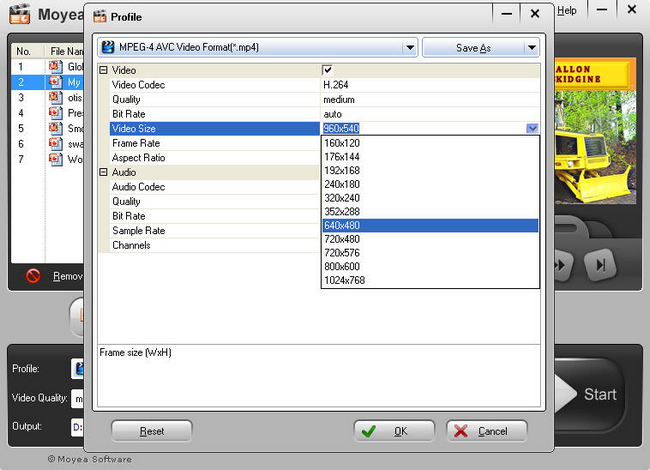
Step 3: (most important!) Choose out video format for your Smartphone. Usually the MP4 will be the best for the output video quality. You need to pay attention to this step, carefully set the video codec, video size,bit rate, etc. To save your time you can also use the default settings.
Step 4: Start converting PowerPoint presentations to Smartphone.
After the conversions is completed, go the output folder and copy the video to your Smartphone for playback.
This listing doesn't necessarily indicate which models are the best selling, just which one readers are most interested.
1. Samsung Galaxy S II
The Galaxy S II is going to be the follow-up to the very popular smartphone from 2010. It will have a larger display than its predecessor, a faster processor, and better camera. This model will run Android OS 2.3 (Gingerbread) on a 1 GHz dual-core processor with TouchWiz 4.0 as its user interface. It is going to include an 8.0-megapixel camera, while a 2.0-megapixel front-facing camera will be used for video conferencing.
How to View PowerPoint on Samsung Galaxy S II
2. HTC Droid Incredible 2
This is the replacement for one of Verizon's most popular Android models of last year. It has a 4-inch, WVGA display -- bigger than the one in its predecessor -- 16GB of internal storage, an unusually good 8 megapixel camera.
How to view PowerPoint on HTC Thunderbolt
3. Apple iPhone 4
Apple's fourth-generation smartphone is a significant upgrade from the iPhone 3GS, offering a much better screen, faster processor, and video conferencing. It has a slimmer design and runs iOS 4.0, the latest version of Apple's operating system. The iPhone 4 has a 5 megapixel rear-facing camera with a flash and either 16 GB or 32 GB of storage.
How to View PowerPoint on iPhone 4
4. LG Optimus 2X
The highlight of this smartphone is a 1GHz NVIDIA Tegra 2 dual-core processor, plus it has a 4-inch WVGA touchscreen, a 8GB of storage, and rear- and front-facing cameras. It runs Google's Android OS 2.2 (Froyo). In the U.S., it's sold as the T-Mobile G2x.
How to View PowerPoint on LG Optimus 2X
5. Sony Ericsson Xperia PLAY
The Sony Ericsson Xperia PLAY is an Android OS smartphone that features a set of dedicated gaming controls, as well as the ability to play PlayStation games. It has the standard PlayStation D-pad, and X, O, square and triangle action buttons, and a trackpad has also been included.But it's more than just a gaming console -- it's a full Android OS smartphone.
How to View PowerPoint on Xperia PLAY
Want to view PowerPoint on Smartphone?
Moyea PPT to Video Converter will help you to convert PowerPoint presentations to Smartphone supported video formats and then you can playback PowerPoint on Smartphones.
Step 1: Free download and install PowerPoint to Smartphone converter.
Step 2: Import PowerPoint files into this program. You can add as many files as you want, no number limit.
Step 3: (most important!) Choose out video format for your Smartphone. Usually the MP4 will be the best for the output video quality. You need to pay attention to this step, carefully set the video codec, video size,bit rate, etc. To save your time you can also use the default settings.
Step 4: Start converting PowerPoint presentations to Smartphone.
After the conversions is completed, go the output folder and copy the video to your Smartphone for playback.
Subscribe to:
Posts (Atom)