ppt-bird

  • Subscribe to our RSS feed.
  • Twitter
  • StumbleUpon
  • Reddit
  • Facebook
  • Digg

Monday, 12 September 2011

Convert PowerPoint to AVI for Mac,Linux,YouTube fro Free

Posted on 23:45 by Unknown

Nowadays we may find out that we cannot live or work without the help of Microsoft PowerPoint. Wherever we are in an office, an organization, a classroom, or at home, Microsoft PowerPoint is indispensable. When you’ve made a presentation with PowerPoint and are about to deliver it to Mac or Linux, or publish it on Internet, or view it on Smartphones or tablets, however, you may find that you can’t. To view PowerPoint with all the original effects, on Mac you can install the Microsoft Office Mac version, while on Linux, many elements will lost with Open Office since no Microsoft Office Linux version is released. Besides, YouTube will reject your PowerPoint due to format incompatibility. Fortunately, you have another method to view PowerPoint on Mac, Linux or YouTube, etc – to convert PowerPoint presentation to AVI for free.

First, let’s take a brief view on the AVI format.

AVI (Audio Video Interleave), first introduced by Microsoft, is a special case of Resource Interchange File Format (RIFF) which divides a file's data into blocks or chunks. An .avi file is used to store audio content or video content compressed with various codecs for playing by Windows Media Player on the computer installed with appropriate codecs. AVI files are supported by Microsoft and even by some standalone DVD players.

How to Convert PowerPoint Presentation to AVI for Free?

Since we are talk about converting PowerPoint, so I suppose you already have Microsoft PowerPoint installed. This method can only be Free if you have the PowerPoint 2010 installed. For previous versions like PowerPoint 2007 and 2003, you need to refer to this article.

At first, save PowerPoint as WMV format in PowerPoint 2010.

In PowerPoint 2010 you can output the PowerPoint as 960×720, 640×480 and 320×240 WMV video directly.
PPT to WMV in PowerPoint 2010

Then, download and install the Free AVI Converter.

Leawo Free AVI Converter is a clean and totally free AVI Converter which can easily convert video to AVI format for further use. It can rip and convert MP4 to AVI, MPG to AVI, WMV to AVI, etc.
Free AVI Converter

Input Formats: WMV, WMA, AVI, RMVB, RM, RA, MOV, QT, MP4, M4V, DV, DAT, MPG, MPEG, MP3, AAC, etc.

Output Formats: AVI, MP3, M4A, AAC, WAV, etc.

Key Features:
- Convert MPG, MOV, WMV, MP4 to AVI
- Join video files together.

After the conversion, you can view the PowerPoint AVI on Mac, Linux, Smartphones, tablets, or upload to YouTube easily. Besides, you can also use this method to add one PowerPoint file into another PowerPoint as reference.


Read More
Posted in PowerPoint Tips, PPT Tool | No comments

Andy Whitfield, Original Spartacus, Dead at 39

Posted on 20:26 by Unknown


Andy Whitfield, the British actor who starred on the first season of Spartacus: Blood and Sand, has passed away from non-Hodgkin’s Lymphoma. He was 39.

Whitfield was diagnosed with treatable Stage 1 non-Hodgkin’s lymphoma in March of 2010, but determined to be cancer-free two months later.
Spartacus: Blood and Sand - Andy Whitfield

However, Starz announced in September of that year that Whitfield would not be return for the show's second season because he had to undergo “aggressive treatment” for a recurrence of the disease. Australian actor Liam McIntyre was named Whitfield's successor.

In a statement released to the Associated Press, it was announced that a “beautiful young warrior,” passed away on a “sunny Sydney morning” in the “arms of his loving wife.” Our thoughts go out to his family and loved ones.

It really shocked when I get to know this news about the original Spartacus actor Andy Whitefield passed away on September 11, 2011. I still remember what a huge success it was, the TV series Spartacus: Blood and Sand. Though at first, I don't really like him, but episode after episode, I found out he played the Spartacus so well; the love for his wife, the love for freedom and love for brothers. Ever since Andy leave the team and for the treatment, many of the Spartacus fans are hoping that he would get well soon and return. But now, he has gone...

Read More
Posted in News | No comments

Friday, 9 September 2011

10 Free Downloadable PowerPoint Templates Websites

Posted on 01:04 by Unknown
Here is 10 websites that allow you to download High Quality free PowerPoint templates:

1. Art of Office – PowerPoint

Art of Office is for Mac users pushing the boundaries of what can be done in Mac Office. Explore.
Art of Office

2. Presentation Point | Free PowerPoint templates to download

Some high-quality PowerPoint templates, free for downloading.
Presentation Point

3. Powered Templates

Free PowerPoint Templates, Free PowerPoint Backgrounds for Your Presentations. Download now!
Powered Templates

4. Mactopia

PowerPoint Templates from Microsoft Office for Mac.
Mactopia

5. Chart Chooser

Use the filters to find the right chart type for your needs. Then download as Excel or PowerPoint templates and insert your data.
Chart Chooser

6. Presentation Helper

You just follow a three stage process to design your own PowerPoint template.
Presentation Helpe

7. Master Templates

Free PowerPoint Templates, PowerPoint Backgrounds for Business Use.
Master Templates

8. Templates Wise

All templates are free to download and includes 2 or more slides ready-to-use.
Templates Wise

9. Brainy Betty Official Site

You will find 100s of free PowerPoint backgrounds, ready to download.
Brainy Betty Official Site


10. DVD-PPT-slideshow | Free PowerPoint templates, background download

Download all kinds of PowerPoint templates and background for free.
DVD-PPT-slideshow

Finally, don’t forget the templates on Microsoft Official Website - Microsoft Office Online.

Microsoft Official Website


Read More
Posted in PowerPoint Background Music, PowerPoint Templates | No comments

Monday, 5 September 2011

Toshiba BDX2250 and BDX1250 Release with Low Price and Great Performance

Posted on 02:05 by Unknown

While HTC is busy burst out new Smartphones like HTC Vigor, HTC Titan, etc, Toshiba doesn’t have rest though. Recently, it has released its thinnest AT200 Honeycomb tablet, ‘wallet-friendly’ TL series 3D TV, Toshiba has announced two new Blu-ray players – with the BDX2250 and BDX1250 due to arrive later this year.

Both players are designed to be affordable but provide decent performance and are billed as "offering the ideal step into the world of Full HD entertainment". The BDX2250 and BDX1250 offer 1080p upscaling, Dolby True HD audio, USB connectivity and BD Live 2.0. The more expensive BDZ2250 also brings an Ethernet port which offers connected applications. We may not expect the 3D experiences on these two Blu-ray players for Toshiba will only use it on its high-end product line.

We cannot directly play PowerPoint with BDX2250 or BDX1250, but what should we do if we need to view a PowerPoint slideshow such as a PPT album on a large screen TV set? An alternative solution should be burning PPT to DVD. So today we will take a look at how to display PowerPoint files on the two Toshiba Blu-ray players.

By burning PowerPoint to DVD:

1. It could properly retain all the original PowerPoint elements like fonts, languages, transitions, animations, music and video clips.

2. It enables us to display PowerPoint without a computer.

3. The output DVD will be good for long time preservation or as a gift to send to other people.

… …

Now let’s follow the guides on how to burn PowerPoint to DVD with Moyea PPT to DVD Burner.

First, free download and install it.

Then, click “Import” to add PowerPoint files. You can add 12 files to this PPT to Toshiba BDX2250, BDX1250 converter at most for burning to DVD at one time.

Next, click “Options” and choose “Create Standard DVD”. You can also choose “Create Blu-ray Disc” or “Convert to Video File”.

Later, you should take some time to customize the output PowerPoint DVD. Click “Menu”, “Music” and “Logo” to create your own menu for the remote control or add music and logo for privacy. Besides using still pictures as DVD/Blu-ray background, you could also add a video as the menu background.

At last, after all the above settings, you can press the “Start” button to begin the PPT to Toshiba DVD conversion process. Just wait for a few minutes and then you could watch the HD PowerPoint on your TV using Toshiba BDX2250, BDX1250 Blu-ray players.
Read More
Posted in PowerPoint Tips | No comments

Must-have iPad 2 Apps (Part 2)

Posted on 00:49 by Unknown

One of the most powerful evidence given by Apple is to say iOS is better than Android is that it has much more apps. Of course it’s true; Apple iOS has so many apps that we users don’t even know which is better. So a lot of these kinds of suggestions are emerging online.

After Steve Jobs announced the iPad 2 in March and release a week later, iPad 2 surely becomes and remains the most popular tablet in the market. In the following few months, all kinds of tablets comes out, some even boast as “iPad killer”, but none of them really matches iPad 2. Here I’d share some must-have iPad 2 apps that I use which I think they could be universally needed by all of you.

1. iMovie

The iMovie should be the equivalence of Windows Movie Maker on iPhone 4, iPod Touch and the amazing iPad 2. It is designed for multi-touch screens, so with iMovie, we could easily make a movie in minutes by adding photos, music, video and effects with our fingers.
iMovie

2. PhotoBooth

PhotoBooth is originally designed for Mac and now Apple has made if off Mac and embedded in iPad 2. What could it do? Interesting. It could edit or warp the photos to your pleasure. Besides the preset effects, you could also create eight “new” versions of your picture. Use the front-facing camera so that you could see your own photo when taking the headshot.
PhotoBooth

3. Phototogene

Photogene is about improving your digital photos and having fun while at it. This intuitive, easy to use application offers a comprehensive set of professional editing tools to Crop, straighten and many other features has included.
Phototogene

4. Urbanspoon

Can’t decide where to eat? Urbanspoon can help. Specifically designed for the iPad, Urbanspoon can show you all the restaurants in your city at the same time. You’ve never seen anything like it.
Urbanspoon

5. Twitter

Another app that has been updated to take advantage of the iPad 2’s cameras. Twitter’s official app is not to everyone’s taste but I think it’s well designed and easy to use. The ability to take a snapshot from within the app is a handy tweak.
Twitter

6. FaceTime

This app was firstly used on iPhone 4 version. Here you get to add your friends name to your favorites list and then you will be able to video call them. You can also switch between the front and rear-facing cameras during a call.this would be one of the interesting and fresh apps for your iPad2.
FaceTime


Download Free PowerPoint Templates Download Free PowerPoint Templates
Read More
Posted in Smartphone/Tablet | No comments

Friday, 2 September 2011

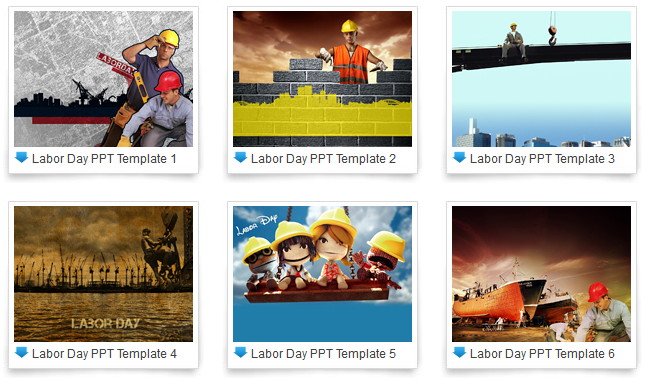
Free Labor Day 2011 PowerPoint Templates Download

Posted on 01:30 by Unknown
Labor Day 2011 is on corner, at this final weekend before the summer and back to school season ends, here we collect these Labor Day PowerPoint templates for free download. Hope you have a happy Labor Day 2011 weekend!

Labor Day PowerPoint Template 1

Labor Day PowerPoint Template 1

Labor Day PowerPoint Template 2

Labor Day PowerPoint Template 2

Labor Day PowerPoint Template 3
 Labor Day PowerPoint Template 3

Labor Day PowerPoint Template 4

Labor Day PowerPoint Template 4

Labor Day PowerPoint Template 5
 Labor Day PowerPoint Template 5

  For more free Labor Day PowerPoint templates, you may download it here:
free Labor Day PowerPoint templates

Free download PowerPoint background:
Download Free PowerPoint Templates Download Free PowerPoint Background
Read More
Posted in PowerPoint Templates | No comments

Thursday, 1 September 2011

How to Convert PowerPoint to Blackberry Torch 9800

Posted on 02:51 by Unknown
Ever after Blackberry Torch 9800 released on in August last year, it has become one of Blackberry’s most popular Smartphones. Blackberry has quite huge reputation among business users for its gorgeous email support and the revolutionary full QWERTY physical keyboard. Blackberry Torch 9800 again marks a milestone for RIM. It perfectly integrated the full keyboard and the currently popular touch screen together with a slide-out design. This change enables Blackberry Torch 9800 to adopt a bigger 3.2-inch touch screen (The same Smartphone released last year, iPhone 4 has 3.5-inch screen). So it will be awesome to play video on Blackberry Torch 9800 but due to the various formats, users may come across such problem that a certain video format could not be supported. This could be easily solved by converting to a Blackberry Torch 9800 favored video format.

As we said, for business users, you may need to view PowerPoint a lot. How to realize to play PowerPoint on blackberry 9800? Since PowerPoint files are not initially supported, we need to convert it to other formats.

The following 3 methods will enable you to watch PowerPoint on Blackberry Torch 9800.

Method 1: Save PPT as video

The benefit of converting PPT to video is that all the original PowerPoint elements could be preserved, such as animations, transitions, music, video, fonts and languages, etc.
PPT to Video Converter

Step 1: Import PowerPoint files. Click “Add” on the interface.

Step 2: Customize the output video format. Click “Settings” to choose a Blackberry Torch 9800 friendly video format and then adjust the video and audio parameters for better effects.

Step 3: Convert. Click “Start” button to convert.

With the shortest time, you could transfer the exported PowerPoint video to Blackberry Torch 9800 for viewing whenever you want.

Method 2: Save PPT as PDF

This is a good way for PDF format is widely supported and a PDF file has small size. However, the dynamic effects of the PowerPoint like animations, transitions, music and video clips will be deleted. This free PPT to PDF converter could help.

Method 3: View PowerPoint online

Although most websites don’t allow users to upload PowerPoint formats but some do. For example, Slideshare.net, you can upload PPT to this website so that you can view PowerPoint on Blackberry Torch 9800 anywhere unless you have network available.

For Android Smartphones, you could also play PowerPoint by installing Office apps. But Blackberry Torch 9800 cannot, for it is running on a different operating system, Blackberry OS 6. Hope that one day Microsoft PowerPoint could be supported by all Smartphones then we don’t need to worry anymore.
Read More
Posted in PowerPoint Tips, Smartphone/Tablet | No comments
Newer Posts Older Posts Home
Subscribe to: Posts (Atom)

Popular Posts

  • How to Use Different themes in One PowerPoint File
    Usually when we create a PowerPoint slideshow, we would use a certain PowerPoint theme. We can get it by creating by ourselves, choose from ...
  • Earth Day 2012 PowerPoint Background Free Download
    Earth Day 2012 is coming in two days. This is the first Earth Day that I really pay some attention to. I know every April 22 is the annual...
  • Best Portable Devices of 2011
    The year 2011 has become a history but absolutely not the technical gadgets (Smartphones & Tablets) that hit the market. Here is a list ...
  • The new iPad Unboxed: What does it Look Like?
    On March 7 we finally get to know that the next generation iPad is neither iPad 3 nor iPad HD , but simply “ the new iPad ”. It seems tha...
  • How to Mute Video in a PowerPoint Presentation
    Really strange question, huh? Mostly people will ask you how to keep the sound in PowerPoint when playing on another computer or something...
  • 8 Online Applications to Save PDF as Word You Should Add to Your Favorites
    PDF has its advantage as a popular document file. As I know, many eBooks, contact, order and many other files are saved as PDF for various r...
  • Tutorial of Converting PPTX to MP4 Video with Professional PPTX to MP4 Converter
    How to convert PPTX to MP4 with this professional Moyea PPTX to MP4 Converter ? The following will show you the step by step guide on conver...
  • How to Add Captions to Photo Album in PowerPoint 2010
    If you have made a Christmas Photo slideshow using PowerPoint 2010 before, you should have noticed that although it is perfect to see each p...
  • How to Add Music to PowerPoint 2007 and Playing Across Slides
    Many people asked the question on how to add music to PowerPoint 2007 and at the same time the music can play across the entire PowerPoint s...
  • Three Spotlights of iPad 2
    Apple Inc. is expected to release iPad 2, its second generation iPad on March 2, and the CEO Steve Jobs may appear on the press conference s...

Categories

  • Back to School
  • Famous Quotes
  • Free Resources
  • Halloween
  • Holiday
  • iPhone 5
  • London Olympics
  • Moive Review
  • News
  • Others
  • photo slideshow maker
  • PowerPoint
  • PowerPoint background
  • PowerPoint Background Music
  • PowerPoint Templates
  • PowerPoint Tips
  • PPT Tool
  • Smartphone/Tablet
  • The Twilight Saga: Breaking Dawn Part 1
  • Wallpaper
  • Wallpapers
  • YouTube

Blog Archive

  • ▼  2013 (5)
    • ▼  April (2)
      • 5 PowerPoint Alternatives for Making Presentations...
      • How to View PowerPoint on Sony Xperia ZL?
    • ►  March (2)
    • ►  February (1)
  • ►  2012 (109)
    • ►  November (2)
    • ►  October (8)
    • ►  September (6)
    • ►  August (13)
    • ►  July (13)
    • ►  June (12)
    • ►  May (12)
    • ►  April (11)
    • ►  March (12)
    • ►  February (12)
    • ►  January (8)
  • ►  2011 (179)
    • ►  December (16)
    • ►  November (18)
    • ►  October (17)
    • ►  September (17)
    • ►  August (29)
    • ►  July (19)
    • ►  June (20)
    • ►  May (15)
    • ►  April (7)
    • ►  March (19)
    • ►  February (2)
Powered by Blogger.

About Me

Unknown
View my complete profile