ppt-bird

  • Subscribe to our RSS feed.
  • Twitter
  • StumbleUpon
  • Reddit
  • Facebook
  • Digg

Friday, 4 May 2012

Space Day 2012

Posted on 01:24 by Unknown
I know how much we have achieved in the process of migrant to other planet. But it’s the first time I get to know that people celebrate Space Day on the first Friday in May. Space Day is an annual event sponsored by Lockheed Martin each May at the National Air and Space Museum locations. Do you celebrate Space Day? How do you celebrate Space Day this year?

Here are some important dates that are written in the history of space exploration, although it is a little American centric, but we have to admit that US does make great contribution to the Space project.

March 16, 1926 – First Liquid Fueled Rocket Launched

May 10, 1946 – First U.S. High Altitude Flight

May 22, 1946 – First American-Designed Rocket Reaches Space

February 20, 1947 – First Animals in Space

October 4, 1957 – First Artificial Satellite

November 3, 1957 – First Live Animal in Space

January 31, 1958 – First American Satellite

October 1, 1958 – NASA is Born

January 2, 1959 – First Spacecraft to Achieve Solar Orbit

September 12, 1959 – First Spacecraft to Impact on the Moon

October 4, 1959 – First View of Moon's Far Side

April 1, 1960 – First Weather Satellite

April 12, 1961 – First Man in Space

May 5, 1961 – First American in Space

February 20, 1962 – First American in Orbit

March 18, 1965 – First Space Walk

July 14, 1965 – First Close-up Images of Mars

February 3, 1966 – First Spacecraft to Land on the Moon

June 2, 1966 – First American Spacecraft on the Moon

September 15, 1968 – First Moon Orbit

December 21, 1968 – First Manned Moon Orbit

July 20, 1969 – First Manned Moon Landing

April 19, 1971 – First Space Station

November 13, 1971 – First Spacecraft to Orbit Another Planet

August-September, 1977 – Launch of Historic Voyager Missions

April 12, 1981 – First Space Shuttle Launch

November 11, 1982 – First Operational Space Shuttle Mission

April 24, 1990 – Launch of Hubble Space Telescope

July 4, 1997 – Mars Pathfinder Lands on Mars

November 20, 1998 – ISS First Module Launched

February 14, 2000 – First Detailed Study of an Asteroid

February 12, 2001 – First Landing on an Asteroid

April 28, 2001 – First Tourist in Space

June 21, 2004 – First Manned Private Space Flight

July 4, 2005 – First Impact With a Comet

If you're going to celebrate this meaningful Space Day, here are some ideas:

• Make planets using clay.

• Make space suits by wrapping yourself in foil and taping it in place.

• Make space shoes by tying sponges on the bottom of your feet.

• Build your own rocket ship control panel by using a cardboard box, foil, and other treasures laying around your house for knobs, etc.

• Make planets out of paper plates.

• Make your own solar system coloring book.

Read More
Posted in Holiday | No comments

Thursday, 3 May 2012

Moyea PPT Converter 2.3.0.58 New with Win 8, Watermark, Preview and PowerPoint Viewer Support

Posted on 19:17 by Unknown
Shenzhen, China, April 18th, 2012 – Moyea Software, an award-winning and professional multimedia software provider with its focused effort on PowerPoint and SWF solutions, has officially released a major upgrade 2.3.0.58 version for Moyea PPT to Video Converter, Moyea PPT to Video Education and Moyea PPT4Web Converter. The upgrade will surely bring tremendously improve the software performance and user experiences thanks to the new features, including the Windows 8 support, PowerPoint Viewer 2007 and 2010 support, function to add your own watermark or logo, and real-time preview during the PowerPoint conversion process.

Moyea PowerPoint Converters are PowerPoint and easy-to-use tools for PowerPoint users to convert PowerPoint to popular video formats like MP4, AVI, WMV, FLV, MOV, etc. for uploading to YouTube or viewing on portable devices like iPad.


What’s new in 2.3.0.58?


1. Added support for Windows 8

Through the upgrade, users are guaranteed to user Moyea PowerPoint Converters on Windows 8 properly when Windows 8 comes to market in October, 2012. Until now, Moyea PowerPoint Converters can work perfectly on Windows 2000/ NT/ XP/ Vista/ Win 7/ Win 8.

2. Added support for PowerPoint Viewer 2007 & 2010

Moyea PowerPoint Converters previously had seamless support for Microsoft PowerPoint versions like 2000, 2003, 2007 and 2010 from Microsoft Office Suite. Through the upgrade, users are able to convert PowerPoint to video with only the free PowerPoint Viewer 2007 and 2010 installed on the computer.

3. Added function of watermark and video layout setting

Unlike the default watermark on the output video for trial, users now are able to add and customize their own watermark on the output video to protect the copyright and as advertisement. The video layout setting enables you to adjust the video layout size and decorate your PowerPoint video background with your favorite picture.

Add watermark to output video

4. Added function of real-time preview during conversion process

In the previous versions, you can only know the video effect after the conversion is finished. And it will be a long time to wait if you are batch converting multiple PowerPoint files to video at a time. The new upgrade allows you to preview the output video real-time during the conversion process with a single click.

Real-time preview during conversion


Links:

Moyea PPT to Video Converter, Moyea PPT to Video Education and Moyea PPT4Web Converter have both free trial version and registered version with prior technical support. Users could freely download Moyea PowerPoint Converters via the following links.

Company Website: http://www.dvd-ppt-slideshow.com/
Moyea PPT to Video Converter: http://www.dvd-ppt-slideshow.com/ppt-to-video/
Moyea PPT to Video Education: http://www.dvd-ppt-slideshow.com/ppt-to-video-education/
Moyea PPT4Web Converter: http://www.dvd-ppt-slideshow.com/ppt-to-flash/


Contact:
Steven
Moyea Software Co., Ltd.
Chief Executive Officer
Email: contact@dvd-ppt-slideshow.com


Read More
Posted in News, PPT Tool | No comments

Watch Your Picasa Web Photo Album On TV With Music

Posted on 00:46 by Unknown
Picasa web album is a smartest growing photo spreading service coming from Google. Some people have published their own pictures to store in Picasa web support and also show picture solely with other most people.

Picasa (the newest version is 3. 9) is a free of cost application coming from Google that will help people arrange as well as manage photos on local hard disk drive, and also distribute your pictures on Picasa Web Album. Picasa 3 succeeds gracefully along with Picasa web album, YouTube and blogger. What's more, it means that you can generate movie and back-up Picasa photos to DVD particularly.

Yet , Picasa 3 does not support adding audio files or effects such as animation, transition just before burning photos to DVD disk. And this instruction will say to you ways to make DVD slideshow with music from Picasa web album for viewing on TV.

Part 1: Download Picasa Albums or Photos

You are able to download whole albums as well as specific pictures on your desktop computer from Picasa Web Albums. Nevertheless , you have to install the Picasa 3 on your hard disk first and also have the Picasa web album account. Click on the Picasa web album you want to down load and then from down load menu choose "Download to Picasa". You will have to login your own Google account for Picasa web album then you may click "Download" to have the web album to local hard drive.

Part 2: Make Picasa web album slideshow DVD

Preparation:

1. Picasa web album on local drive

2. Microsoft PowerPoint

3. Photo DVD Maker

4. Song for background music

Step 1: Add Downloaded Picasa Photos to PowerPoint

Run Ms PowerPoint and then click on "Insert" and select "Photo Album" to help you import your complete Picasa web album on your laptop to PowerPoint slideshow at the time. Every one slide should have a single Picasa photo on it.

Step 2: Add the song as background music

If you have imported Picasa photos, now you can put in the particular music to PowerPoint as music. MP3 FORMAT and WAV are advisable for greater compatibility. Set the music play instantly and commence from very first slide and then eliminate at the final slide. Check the "Loop" option in order that it should play consistently. Later create some other components such as computer animation, transition, videos, narration, words and phrases, and so on to help make the slideshow to next degree.


Step 3: Import the photo slideshow to photo DVD maker

Import the Picasa photo PowerPoint presentation to Moyea PPT to DVD Burner to help you burn the PowerPoint to DVD disc when conserving all the initial elements and effects. The burner enables you to burn PowerPoint to Bluray and transform PowerPoint to movie for spreading online or watching on iPhone too. You should also add the background music within this tool instead.

Step 4: Burn Picasa photo DVD slideshow with menu

Just before burning to DVD disc, build your personal DVD menu to better arrange your Picasa photo DVD slideshow by means of chapters. Last of all, click "Start" to burn Picasa DVD. You'll be able to watch your Picasa web album on your TELEVISION with music by using a standard DVD player.
Read More
Posted in PowerPoint Tips | No comments

Friday, 27 April 2012

Mother's Day 2012 PowerPoint Background Free Download

Posted on 23:51 by Unknown

The annual Mother's Day for 2012 is coming in two weeks. It's time for us to think about what gift we can prepare for our affectionate mother. Happy Mother's Day PowerPoint is a classic design that you can easily express your love and thankfulness. The Mother's Day PowerPoint can further be converted PPT to video for sharing on YouTube or burn PPT to DVD as gift for long-term storage and watching on TV with whole family.

If you're going to make a happy Mother's day PPT, you can use these Mother's Day PowerPoint background to make a presentation explaining what the meaning of the Mother's Day is.

Mother's Day PowerPoint background -1

Mother's Day PowerPoint background -2

Mother's Day PowerPoint background -3

Mother's Day PowerPoint background -4

Mother's Day PowerPoint background -5

Mother's Day PowerPoint background -6


How to create Mother's Day PowerPoint template using these free Mother's Day PowerPoint background?

Because Blogger doesn't allow me to upload ready PowerPoint template, never mind, below I will show you how to create Mother's Day PowerPoint template yourself.

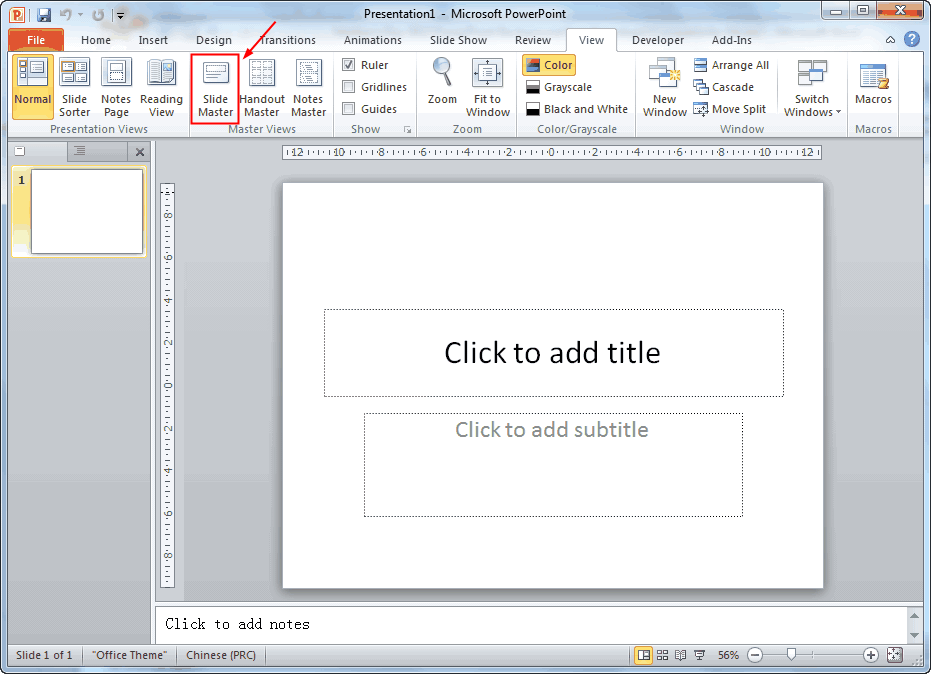
Open your PowerPoint (PowerPoint 2010 for me), go to the “View” tab, and click “Slide Master” below.
create Mother's Day PowerPoint template -1


Now you're in the Master View mode, by default the second slide is selected. Remember to select the First slide, with “1” on the left. That is the master slide, everything you do on this slide will be applied to all slides.
create Mother's Day PowerPoint template -2


Now click “Insert” tab to add the Mother's Day PowerPoint background. You will see all the slides like this:
create Mother's Day PowerPoint template -3


Click “Close Master View” to apply the changes.
create Mother's Day PowerPoint template -4


To save as Mother’s Day PowerPoint template so that you can simply double-click to use, click “Save As” and choose “PowerPoint Template” as output format.

Happy Mother's Day!

Mother's Day Related:

Top Mother's Day songs for DVD slideshow

Mother's Day Poems That You Can Use In PowerPoint

8 Sites That You Can Get Mother's Day Cards

10 Free Downloadable PowerPoint Templates Websites

Free PowerPoint Templates for Mother's Day

How to Create a Mother's Day DVD Slideshow Using Google's Picasa Photos


Read More
Posted in Free Resources, Holiday, PowerPoint Templates | No comments

Thursday, 26 April 2012

View PowerPoint on Toshiba Excite 10 LE

Posted on 23:34 by Unknown
It will ever to wrong to make your tablet even thinner and lighter in the mess of tablet market where all most all mobile producers or former computer manufacturers are getting involved in. Last year, Toshiba released its full-featured tablet – Toshiba Thrive, but the result is not so satisfying.
Toshiba Excite 10 LE

The new Toshiba Excite 10 LE is a big hit because of its thin body and light weight. Let’s take a look at what Toshiba Excite 10 LE is compared to other popular tablets.
Toshiba Excite 10 LE Apple iPad (2012) Asus Transformer Prime Samsung Galaxy Tab 10.1
Weight in pounds 1.12 1.44 1.32 1.24
Width in inches (landscape) 10.1 7.3 10.3 10.1
Height in inches 6.9 9.5 7.1 6.9
Side bezel width in inches (landscape) 0.75 0.87 0.8 0.8

Brief information of Toshiba Excite 10 LE:

The Toshiba Excite 10 LE is the thinnest, lightest 10-inch tablet, weighing in at 1.2 pounds and measuring .3 inch thin. This tablet is powered by Android 4.0 - Ice Cream Sandwich, and offers expandability with a variety of built-in ports, including HDMI, USB, and microSD card. Bluetooth for wireless headphones and a keyboard is also available. The 10.1-inch tablet has a 1280x800, LED-backlit display and the screen is made of Corning Gorilla Glass.
Toshiba Excite 10 LE

Almost all the websites are eager to talk about the cameras, but I wonder how many people do you really use a phone to take pictures or record HD videos? For me, never. Anyway Toshiba Excite 10 LE offers 5MP camera which is able to take up to 720p video, which could be enough for ordinary uses and a front-facing camera for video meeting, if necessary.

Besides, expected features such as GPS, Bluetooth audio and peripheral support, and integrated speakers are all here.

If you’re interested in this Toshiba Excite 10 LE tablet, what does it matter to read the following few words? Assume you need to view the PowerPoint when you’re not in the office with computer by your side, you may need to install Office apps like Quickoffice or Document To Go for Android. But if the PowerPoint has important narrations or video clips embedded, you should try another method – convert PowerPoint to video to keep all the information.

Related posts you may be interested:

Top Office Apps for Android Smartphone

Best Android Apps to Improve Your Work and Save Time

5 Best Free Android Apps for Kids

Android Smartphone's 20 Most Useful Apps

Read More
Posted in PowerPoint Tips, Smartphone/Tablet | No comments

Tuesday, 24 April 2012

Apple Will Release iPhone Nano Together with iPhone 5 in 2012

Posted on 01:57 by Unknown
The semi-annual iPhone Nano rumor has surfaced yet again, this time with news claiming that Apple will release the small, entry-level device at the same time as the iPhone 5 in 2012.

China Times is reporting that Apple is looking to expand into the low-end smartphone market, as its lowest price iPhone is too expensive to compete with entry-level Android smartphones. The newspaper also reported that the iPhone-producer is planning to release this new low-end model later this year, possible at the same time the sixth-generation iPhone hits the market.

At the moment, Apple’s iPhone 3GS is the cheapest at $375. While it does seem a lot cheaper compared to the iPhone 4S, it’s still a lot more expensive than some budget Android phones. On the other hand, the third-generation of iPad named the new iPad was released in March with its astonishing 2048 x 1536 retina display and more powerful hardware like the A5X processor. But great pressure is then when Amazon claimed to released its second-generation Kindle Fire, which is a strong competitor toward iPad because of its great performance and low price.
iPhone Nano size

This is hardly the first time rumors of a smaller, cheaper iPhone have surfaced. The iPhone Nano is rumored to be one-third smaller than the iPhone 4S, about 2.65-inch screen, still clear enough if you want to view PowerPoint on iPhone Nano, watch movie on it, play games on it. Although the rumor of a low-end iPhone Nano has been reporting since at least 2009, but it seems that Apple is holding its bottom line. With the vast growth and fast popularity of Android smartphones, will Apple change this time?

It’s about time too. As they did with the iPod by releasing different versions of the same device in different price ranges to appeal to a broader market, Apple can again corner the market by making an iPhone for everyone, regardless of your budget.

We’re more interested in seeing what the iPhone 5 will look like, but Apple will probably have their way and blow everyone away with this miniature device as well. If it has some extra features that it’s bigger brother doesn’t, which could be one incentive to interest shoppers. Let us know your thoughts on a possible iPhone Nano.

Read More
Posted in News, Smartphone/Tablet | No comments

Monday, 23 April 2012

8 Online Applications to Save PDF as Word You Should Add to Your Favorites

Posted on 23:23 by Unknown

PDF has its advantage as a popular document file. As I know, many eBooks, contact, order and many other files are saved as PDF for various reasons and security is one of them. Once saved as PDF file, you cannot copy the contents out or edit the PDF file unless using PDF Editor which needs to pay.

Assume you find the material you want but in PDF format, then you need to save PDF as Word for Word is much more universal and easy to edit. Here we are going to introduce 8 online applications for you to save PDF as Word. Add them to your favorites, don't need to download anything or install on your computer. All you need is a browser with Internet connection, upload you PDF to the websites and you will get the Word as soon as possible.

1. PDF to Word


One of the most popular online PDF to Word converters online, other free tools like PDF to Excel and Word to PDF are available too. You should have a try.

2. Zamzar


Not only a PDF to Word converter. It supports much more formats like image formats, document formats, video formats and audio formats. Upload your PDF in Step 1, select “Doc” in Step 2, fill in your email address in Step 3, press “Continue” in Step 4. Once the conversion is finished, Zamzar will send you an email and you can download the converted Word.

3. PDF Online PDF to Word Converter


Select the PDF file you want to convert to Word, and click “Convert” to upload and convert in one step.

4. Convert PDF to Word


The desktop version needs to pay, but for ordinary people, the online PDF to Word application is enough. A lot of other tools are provided too, you can see them on the top navigation bar, like PDF to Text, PDF to JPG, DOC to PDF, etc.

5. Free PDF Converter


This application supports converts online PDF to Word as well upload local PDF. Select the output format as “Word (doc)”, then fill you email address and convert the file.

6. PDF to Word Converter


Select you PDF file you want to convert to Word and enter you email address and click “Send” to begin the uploading and conversion.

7. PDF to Word Online converter


Another free online application to convert PDF to Word, it provides detailed options for you to choose about the format you want to keep in the output Word file. Like others you need to fill in your email address.

All of the above free online PDF to Word applications can help you to convert PDF to Word for your needs. But they require you to:
  • Upload the PDF file
  • Fill in your email address
So you should be careful to protect your privacy. If the PDF content is very important or confidential, I suggest you try other methods.

8. Google Docs


Google Docs can also help you to convert PDF to Word. Here is the guide on how to do in steps. Google Docs is much safer for:
  • Google is a trustful company
  • You’re uploading PDF to your own account
Do you have any other free online applications to convert PDF to Word?
Read More
Posted in Free Resources, PPT Tool | No comments
Newer Posts Older Posts Home
Subscribe to: Posts (Atom)

Popular Posts

  • How to Use Different themes in One PowerPoint File
    Usually when we create a PowerPoint slideshow, we would use a certain PowerPoint theme. We can get it by creating by ourselves, choose from ...
  • Earth Day 2012 PowerPoint Background Free Download
    Earth Day 2012 is coming in two days. This is the first Earth Day that I really pay some attention to. I know every April 22 is the annual...
  • Best Portable Devices of 2011
    The year 2011 has become a history but absolutely not the technical gadgets (Smartphones & Tablets) that hit the market. Here is a list ...
  • The new iPad Unboxed: What does it Look Like?
    On March 7 we finally get to know that the next generation iPad is neither iPad 3 nor iPad HD , but simply “ the new iPad ”. It seems tha...
  • How to Mute Video in a PowerPoint Presentation
    Really strange question, huh? Mostly people will ask you how to keep the sound in PowerPoint when playing on another computer or something...
  • 8 Online Applications to Save PDF as Word You Should Add to Your Favorites
    PDF has its advantage as a popular document file. As I know, many eBooks, contact, order and many other files are saved as PDF for various r...
  • Tutorial of Converting PPTX to MP4 Video with Professional PPTX to MP4 Converter
    How to convert PPTX to MP4 with this professional Moyea PPTX to MP4 Converter ? The following will show you the step by step guide on conver...
  • How to Add Captions to Photo Album in PowerPoint 2010
    If you have made a Christmas Photo slideshow using PowerPoint 2010 before, you should have noticed that although it is perfect to see each p...
  • How to Add Music to PowerPoint 2007 and Playing Across Slides
    Many people asked the question on how to add music to PowerPoint 2007 and at the same time the music can play across the entire PowerPoint s...
  • Three Spotlights of iPad 2
    Apple Inc. is expected to release iPad 2, its second generation iPad on March 2, and the CEO Steve Jobs may appear on the press conference s...

Categories

  • Back to School
  • Famous Quotes
  • Free Resources
  • Halloween
  • Holiday
  • iPhone 5
  • London Olympics
  • Moive Review
  • News
  • Others
  • photo slideshow maker
  • PowerPoint
  • PowerPoint background
  • PowerPoint Background Music
  • PowerPoint Templates
  • PowerPoint Tips
  • PPT Tool
  • Smartphone/Tablet
  • The Twilight Saga: Breaking Dawn Part 1
  • Wallpaper
  • Wallpapers
  • YouTube

Blog Archive

  • ▼  2013 (5)
    • ▼  April (2)
      • 5 PowerPoint Alternatives for Making Presentations...
      • How to View PowerPoint on Sony Xperia ZL?
    • ►  March (2)
    • ►  February (1)
  • ►  2012 (109)
    • ►  November (2)
    • ►  October (8)
    • ►  September (6)
    • ►  August (13)
    • ►  July (13)
    • ►  June (12)
    • ►  May (12)
    • ►  April (11)
    • ►  March (12)
    • ►  February (12)
    • ►  January (8)
  • ►  2011 (179)
    • ►  December (16)
    • ►  November (18)
    • ►  October (17)
    • ►  September (17)
    • ►  August (29)
    • ►  July (19)
    • ►  June (20)
    • ►  May (15)
    • ►  April (7)
    • ►  March (19)
    • ►  February (2)
Powered by Blogger.

About Me

Unknown
View my complete profile