ppt-bird

  • Subscribe to our RSS feed.
  • Twitter
  • StumbleUpon
  • Reddit
  • Facebook
  • Digg

Wednesday, 13 June 2012

Father's Day 2012 Giveaway, Coupon Code from Moyea

Posted on 00:54 by Unknown
father's day promotion

Moyea Father's Day promotion is already available online. This year they have choosen SWF to 3GP Converter as the giveaway present. You just need to fill in your Name and Email address and you will get it for free immediately.

Also a coupon code is offered for all Moyea products. This coupon code equals 20% discount for PowerPoint converters on http://www.dvd-ppt-slideshow.com/ and $20 instant price off on other Moyea websites like moyeamedia.com, dvd-ppt-slideshow.com, swfkits.com and flash-video-mx.com except SWF to Video SDK.

Coupon code: DAD-45K2D46B9F, can only be used for SWREG payment.

Validate date: Until June 24th, 2012

father's day coupon code

For more Father's Day promotion information, you can visit: http://www.moyeamedia.com/software-giveaway/
Read More
Posted in Holiday, News | No comments

Tuesday, 12 June 2012

How to Convert PowerPoint 2003 to Video and PDF

Posted on 01:39 by Unknown
The newest PowerPoint for Windows system is PowerPoint 2010, but there are still lots of people who are using older versions. Like IE6, the most widely used PowerPoint version should be PowerPoint 2003, which comes with Windows XP.

Until 2010, I am still using PowerPoint 2003. And after 1 year of 2007 I quickly switched to PowerPoint 2010. But for many people it is not easy to leave the so familiar PowerPoint 2003 interfaces.

PowerPoint added new features to save PowerPoint as WMV video and output PDF directly. For PowerPoint 2003 users, this free PPT to PDF converter can help you to save PowerPoint, Word and Excel to PDF format.

To save PowerPoint 2003 as video, Moyea PPT to Video Converter would be a great help. The PowerPoint to video conversion preserves all the original PowerPoint effects like animations, transitions, music and video clips. It support PowerPoint 2010, 2007, 2003, 2000, etc. and PowerPoint Viewer. It can convert PowerPoint to popular video formats like MP4, AVI, WMV, FLV, MOV, MKV, 3GP/3G2 and the latest WebM video.

If you’re interested, take a look at how to use it briefly.

Step 1: Click Add to import PowerPoint files.

Step 2: Click Profile to select an output video format.

Step 3: Click Settings to adjust the output video parameters. (optional)

Step 4: Click Customize to change some PowerPoint settings. (optional)

Step 5: Click Start to convert PowerPoint 2003 to video.

ppt 2003 to video converter


For detailed tutorial, you can read it here.

OS: Windows 8/7/Vista/XP/2000/NT

Retail Price: $49.95

Link: http://www.dvd-ppt-slideshow.com/ppt-to-video/
Read More
Posted in PPT Tool | No comments

Friday, 8 June 2012

PowerPoint to WebM Converter

Posted on 00:51 by Unknown
For years if we want to share PowerPoint on YouTube, we need to convert PowerPoint to video first because YouTube accepts only videos. Nowadays the fast pace of modern life and high developed mobile technology makes it possible to watch movies, play video games and view PowerPoint anytime anywhere on the move; today it means iPad, iPhone and other tablets or smartphones.

The lack of Adobe Flash support may be the last restriction that lays before PowerPoint for Adobe Flash is needed for viewing YouTube videos. The new HTML5 technology makes it possible to play videos directly in browser without Adobe Flash player plugin. It is realized by the HTML5 video tag .

The HTML5 friendly video format WebM is supported by YouTube. Moyea PPT to Video Converter is one of the few PPT tools that support WebM output. It performs accurate PowerPoint to WebM conversion and preserves all the features of PowerPoint presentations, including animations, transitions, PowerPoint styles, and embedded audio and video clips.
ppt to webm converter


It also allows users to fine-tune the conversion of PowerPoint to WebM, to add background music, add watermark, adjust video layout, and modify video size of the presentation as well as bit rate, frame rate, codec of audio and video. Finally, you can preview the WebM video during the conversion.

OS: Windows 8/7/Vista/XP/2000/NT

Retail Price: $49.95

Link: http://www.dvd-ppt-slideshow.com/ppt-to-video/
Read More
Posted in PPT Tool | No comments

Thursday, 7 June 2012

Nintendo Wii U GamePad

Posted on 02:23 by Unknown
Nintendo has finally launched the brand-new video gaming console Nintendo Wii U GamePad. Games already announced are BIT.TRIP Runner 2, Chasing Aurora, Cloudberry Kingdom, and 1000 Spikes. The system is backwards compatible with Wii and Wii U games can support compatibility with Wii peripherals, such as Wii Remote Plus and Nunchuk.

The GamePad looks like a hybrid of a tablet and controller. It has a 6.2-inch touchscreen, two sticks, a directional pad, left and right bumpers, triggers, and the A,X,B, Y buttons. The GamePad also has a rumble feature, microphone, gyro sensor, and camera.

Wii U GamePad has the same 3-5 hour of battery lifespan as the Nintendo 3DS. Besides, it will come with an adapter, so you can charge it as you play.

Want to see the game picture on larger screen? You can use Wii U GamePad to control over the TV. The GamePad will act as a secondary screen that shows maps, stats and other information.

Bedsides the games, with the help of PPT to video converter, you can also viewing PowerPoint on Wii U GamePad. It will be great to view PowerPoint on its 6.2-inch screen, which is large enough to view HD PowerPoint slideshows. Just as mentioned above, it has initial control over TV so you can view your PowerPoint on TV this way using Wii U GamePad.
Read More
Posted in Smartphone/Tablet | No comments

Wednesday, 6 June 2012

Review: Moyea PowerPoint to DVD Burner

Posted on 00:58 by Unknown


PowerPoint can be easily turned into other styles for viewing with no PowerPoint program or even without computer. This converter program enable users to burn PowerPoint to DVD or Blu-ray Disc and convert PowerPoint to MP4, AVI, WMV, MOV, MKV, VOB, 3GP/3G2, etc. It is also capable of capturing a complete PowerPoint presentation including animations, sounds, transitions and movie clips to its video copy.


By burning PowerPoint to DVD or Blu-ray disc, you can play PowerPoint with DVD/Blu-ray player and enjoy it on the large screen of TV. A DVD slideshow is also convenient for you to send to others as gift or keep permanently. By converting to video, you can access PowerPoint presentations to web (e.g. YouTube, Facebook) and portable devices such as iPod, iPad, iPhone, PSP, Blackberry and Android devices.

A wide range of PowerPoint versions are supported including PPT 2000 to 2010.With the free PowerPoint Viewer 2007/2010 users can covert PowerPoint to video formats even without Microsoft Office suite installed. 

It also offers users different layouts, flexible options to adjust the video and audio parameters (such as bit rate, frame rate, video size, sample rate, aspect ratio, etc.).

Customization of the output file is also possible such as slide transition timing, muting of the original audio files, insertion of background music, and more. You can add your own watermark to credit your work or place your school photo or even the mascot. Create a DVD menu so that you can remote control the PowerPoint playback on TV using a DVD player.

It generates a slick video from your PowerPoint file within a few minutes. The real-time preview function enables you to watch the output video during the conversion process.

OS: Windows 8/7/Vista/XP/2000/NT

Retail Price: $99.95

Link: http://www.dvd-ppt-slideshow.com/ppt_to_dvd/
Read More
Posted in PPT Tool | No comments

Monday, 4 June 2012

Powerful Online Converter Free

Posted on 00:05 by Unknown
You know it is really confusing that so many different formats are out there. Video format, audio format, image format, flash format, document format, object format and so on, these are the format groups. And for each category, it contains the final format that we are familiar with like MP4, AVI, MP3, JPG, DOC, PPT, etc. Even more formats are emerging because different companies want to hold their own standards, such as the new WebM created by Google.

So many formats which may not compatible with each other and we cannot expect the media player on PC, smartphone, tablets, etc. to support all these formats. What if the format is not supported and how to play the media then? The answer is convert, convert it to supported format.

It is natural that people loves these free stuffs. And I will introduce a free online converter for you.

http://www.online-convert.com/ is an online converter for you to convert your file to other formats without install anything on your computer.

It is an all-in-one online converter, which contains 7 categories.

Audio Converter: Convert your audio to AAC, MP3, M4A, OGG, WAV, WMA, etc.

Video Converter: Convert other formats to video like MP4, AVI, FLV, MOV, WebM, etc. I have tested that you can upload PowerPoint file and convert to video here.


Image Converter: Convert your image to BMP, GIF, JPG, PNG, etc.

Document Converter: Convert your document to Doc, PDF, TXT, etc. Among all the output doc formats, I think PDF is most useful. Now we have a new way to convert PowerPoint to PDF for free beside free PPT to PDF converter.

Ebook Converter: Convert your document to Ebook format for viewing on Ebook reader or tablet like Kindle Touch, Kindle Fire, Nook Tablet, etc.

Archive Converter: Online compressor to compress you file to 7Z, ZIP, etc.


Hash Generator: I don’t know what it is used for. If you know, plz tell me.

How to use:

1. Select the converter (one out of the 7)
2. Select an output format
3. Upload your file and click Convert file

4. Download the output file


According to my test, I think the advantages of http://www.online-convert.com/ are:

1. Wide range of formats support
2. Really fast uploading and converting speed
3. Don’t need to fill in our Email address
4. Get the download link immediately after conversion finished

The disadvantage of converting PowerPoint to video this way:

The output video quality is great, but the PowerPoint animation, transition, music and video clips will be removed. So if you want to keep all these stuffs in the output video, Moyea PPT to Video Converter will be a better choice.
Read More
Posted in Free Resources, PPT Tool | No comments

Friday, 1 June 2012

How to Print Multiple Slides on One Paper in PowerPoint 2010

Posted on 00:12 by Unknown

Usually we would view PowerPoint documents directly using the PowerPoint program. But for some occasions you may need to print the PowerPoint on paper. Some asked this question on Yahoo Answer:

I have created a PowerPoint for my presentation next Tuesday and I want to print the PowerPoint out as handout for the audiences. To save the papers, how can I print multiple PowerPoint slides on one paper?

PowerPoint allows you to print the PowerPoint slides out on paper and offers you options to choose for the way you want. In fact, it is quite easy. We will still discuss it in detail for those people who have these troubles. We will take PowerPoint 2010 as the example.

Step 1: Open the PowerPoint file, and click File → Print.
print powerpoint -1


The Print settings of PowerPoint 2010 are listed here:
print powerpoint -2

Step2: Select which PowerPoint slides you want to print. Click on the drop marker of Print All Slides, in the drop-down list, you can choose:
print powerpoint -3

Print All Slides: The entire PowerPoint slides will be printed.

Print Selection: Only print the selected slides. You need to click Ctrl and select the slides you want to print and then come to this Print setting page.

Print Current Slide: Print the slide you are viewing right now.

Custom Range: Just type in the slide number to choose the slides to print, like: 1, 5, 9, 10, 15, 19, with a comma between two numbers.
print powerpoint -4

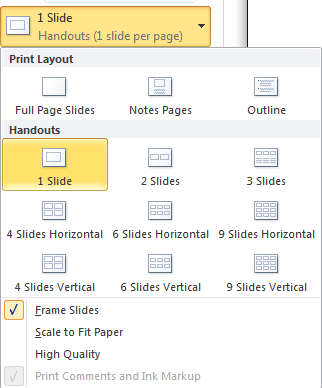
Step 3: Select how many slides on one page. Click on the drop marker of 1 Slide, in the drop-down list, you can choose:


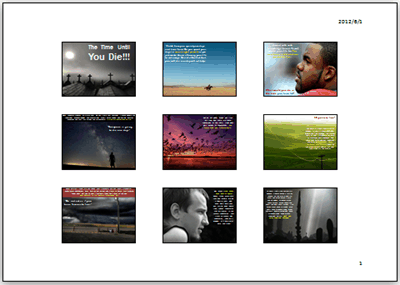
To print multiple slides on one paper, you should select one from the Handouts group.
print powerpoint -5

Frame Slides: A frame effect on the slides.

Scale to Fit Paper: Suggested to choose to make the slides on paper larger maybe.

High Quality: Not clear on may compute, you can select this option.

Step 4: Portrait Orientation or Landscape Orientation.
print powerpoint -6

What's the difference?

Portrait Orientation:
print powerpoint -7

Landscape Orientation:
print powerpoint -8


Step 5: Color style.
print powerpoint -9

Step 6: If you have printer connected, click the Print icon on the top to start your printing.
print powerpoint -10

Besides print PowerPoint to papers, I think a more green way would be better by converting PowerPoint to PDF or convert it to DVD or video that will avoid the waste of papers.
Read More
Posted in PowerPoint Tips | No comments
Newer Posts Older Posts Home
Subscribe to: Posts (Atom)

Popular Posts

  • How to Use Different themes in One PowerPoint File
    Usually when we create a PowerPoint slideshow, we would use a certain PowerPoint theme. We can get it by creating by ourselves, choose from ...
  • Earth Day 2012 PowerPoint Background Free Download
    Earth Day 2012 is coming in two days. This is the first Earth Day that I really pay some attention to. I know every April 22 is the annual...
  • Best Portable Devices of 2011
    The year 2011 has become a history but absolutely not the technical gadgets (Smartphones & Tablets) that hit the market. Here is a list ...
  • The new iPad Unboxed: What does it Look Like?
    On March 7 we finally get to know that the next generation iPad is neither iPad 3 nor iPad HD , but simply “ the new iPad ”. It seems tha...
  • How to Mute Video in a PowerPoint Presentation
    Really strange question, huh? Mostly people will ask you how to keep the sound in PowerPoint when playing on another computer or something...
  • 8 Online Applications to Save PDF as Word You Should Add to Your Favorites
    PDF has its advantage as a popular document file. As I know, many eBooks, contact, order and many other files are saved as PDF for various r...
  • Tutorial of Converting PPTX to MP4 Video with Professional PPTX to MP4 Converter
    How to convert PPTX to MP4 with this professional Moyea PPTX to MP4 Converter ? The following will show you the step by step guide on conver...
  • How to Add Captions to Photo Album in PowerPoint 2010
    If you have made a Christmas Photo slideshow using PowerPoint 2010 before, you should have noticed that although it is perfect to see each p...
  • How to Add Music to PowerPoint 2007 and Playing Across Slides
    Many people asked the question on how to add music to PowerPoint 2007 and at the same time the music can play across the entire PowerPoint s...
  • Three Spotlights of iPad 2
    Apple Inc. is expected to release iPad 2, its second generation iPad on March 2, and the CEO Steve Jobs may appear on the press conference s...

Categories

  • Back to School
  • Famous Quotes
  • Free Resources
  • Halloween
  • Holiday
  • iPhone 5
  • London Olympics
  • Moive Review
  • News
  • Others
  • photo slideshow maker
  • PowerPoint
  • PowerPoint background
  • PowerPoint Background Music
  • PowerPoint Templates
  • PowerPoint Tips
  • PPT Tool
  • Smartphone/Tablet
  • The Twilight Saga: Breaking Dawn Part 1
  • Wallpaper
  • Wallpapers
  • YouTube

Blog Archive

  • ▼  2013 (5)
    • ▼  April (2)
      • 5 PowerPoint Alternatives for Making Presentations...
      • How to View PowerPoint on Sony Xperia ZL?
    • ►  March (2)
    • ►  February (1)
  • ►  2012 (109)
    • ►  November (2)
    • ►  October (8)
    • ►  September (6)
    • ►  August (13)
    • ►  July (13)
    • ►  June (12)
    • ►  May (12)
    • ►  April (11)
    • ►  March (12)
    • ►  February (12)
    • ►  January (8)
  • ►  2011 (179)
    • ►  December (16)
    • ►  November (18)
    • ►  October (17)
    • ►  September (17)
    • ►  August (29)
    • ►  July (19)
    • ►  June (20)
    • ►  May (15)
    • ►  April (7)
    • ►  March (19)
    • ►  February (2)
Powered by Blogger.

About Me

Unknown
View my complete profile